











Best Golf Launch Monitors 2026: Top Picks for Golfers
Posted by Tayte Andruss on Feb 25th 2026
If you’re looking to level up your game in 2026, investing in the best golf launch monitor can make all the difference. Whether you’re a seasoned pro or just starting your journey, these top golf launch monitors bring professional-grade data to your fingertips, helping you enhance your swing and fine-tune your performance on the course. In this guide, we break down our top picks, why serious players trust them, and how to choose the best setup for your game without getting lost in specs or hype.
Best Golf Launch Monitors 2026
If you’re looking for the best golf launch monitors in 2026, you likely want to turn your practice sessions into measurable performance gains. Our collection includes only professional‑grade launch monitors trusted by serious players, instructors, and indoor simulator enthusiasts. These are the same brands you’ll find at PGA Tour events, teaching academies, and top‑tier training facilities—delivering the same level of accuracy and insight used by the pros. We have given our top launch monitor recommendations, highlighted who each model is best suited for, and outlined the most important features to consider. That way, you can confidently choose the launch monitor that fits your game goals—not just the one with the highest price tag.
Garmin Approach R50
The Garmin Approach R50 is our “do‑everything” premium portable option, giving you serious data, simulator play, and easy setup in a compact package. It’s aimed at golfers who want a personal Garmin golf launch monitor they can use both indoors and outdoors without a huge footprint or complicated install.
Specifications
- Launch monitor type: Radar‑based, designed for use both indoors and outdoors with proper ball‑to‑unit spacing.
- Core ball data: Ball speed, launch angle, carry distance, total distance, spin metrics, and shot direction parameters depending on software setup.
- Club data (with compatible modes/software): Clubhead speed, smash factor, and some path‑related metrics depending on configuration and software support.
- Simulator compatibility: Works with multiple simulator packages (through Garmin’s ecosystem and partner integrations) so you can turn a hitting bay into a full golf simulator.
- Portability: Compact body, rechargeable battery, and simple tripod‑style placement behind the ball.
Reasons to buy
- You want the best portable launch monitor that pulls double duty at the range and in a simulator setup at home.
- You’re focused on carry distance gapping, ball speed, and launch numbers to dial in drivers, fairways, and wedges.
- You prefer a cleaner footprint compared to larger, permanent units and like being able to store the R50 away between sessions.
- You’re looking for big‑time data, and golf launch monitor reviews consistently rank Garmin among the top choices for serious practice.
Reasons to avoid
- You plan to build a dedicated indoor studio and want a photometric unit mounted closer to the hitting area instead of a radar unit behind the ball.
- You’re chasing every possible advanced club‑head metric and prefer the camera‑based precision of Foresight’s higher‑end models.
Best Photometric
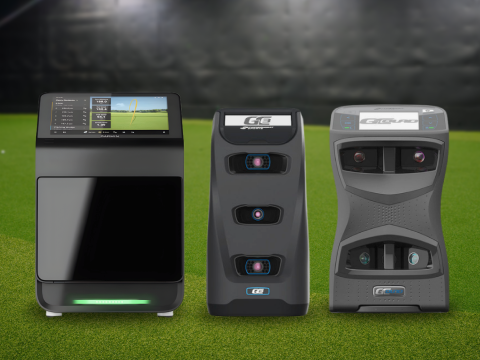
Foresight GC Quad Launch Monitor
The Foresight GC Quad Launch Monitor is the standard for serious players and coaches who want photometric accuracy that matches what they see week after week on professional tours. This is the best golf monitor option for players building a true performance studio or top‑tier sim room where every swing needs tour‑level feedback.
Specifications
- Launch monitor type: Photometric (four high‑speed cameras capturing the moment of impact from multiple angles).
- Ball data: Ball speed, launch angle, azimuth, total spin, spin axis, peak height, carry, and more.
- Club data (with add‑ons): Club path, face angle, lie, impact location, angle of attack, and dynamic loft when properly configured.
- Use cases: Indoors or outdoors on the range, with excellent reliability as long as the hitting area is set up correctly and balls and club faces are readable.
- Simulator integration: Supports premium simulation software, making it a favorite in high‑end sim studios and teaching bays.
Reasons to buy
- You want the best Foresight launch monitor pros and top instructors trust, with proven photometric accuracy and repeatable numbers across thousands of swings.
- You’re building a premium home or commercial simulator and need performance that keeps up with players who hit a lot of balls and swing fast.
- You value detailed club data such as path, face angle, and impact location to tighten dispersion and make equipment decisions with confidence.
Reasons to avoid
- Your budget is capped well below five figures, and you’d rather invest in a slightly more affordable Foresight model.
- You don’t need advanced coaching‑grade metrics and just want a straightforward personal device.
Best Shot Detection
Full Swing KIT Launch Monitor
The Full Swing KIT launch monitor is known for quick, responsive shot tracking with strong outdoor performance and a clear on‑unit display. Full Swing Launch Monitor is built for players who like to see instant numbers on the range without always looking back at a phone or tablet.
Specifications
- Launch monitor type: Radar‑based unit positioned behind the golfer.
- Data parameters: Ball speed, club speed, carry, total distance, launch angle, spin metrics, and more, depending on setup and subscription level.
- Display: Bright built‑in screen displaying key metrics right on the unit, which keeps practice simple and fast.
- Use cases: Ideal for outdoor ranges, but can also be used in indoor simulator environments with the right ball‑to‑screen spacing.
Reasons to buy
- You want fast, reliable shot detection with feedback visible on the unit itself, which makes range sessions easier to manage.
- You prefer a radar option that can keep up with drivers, long irons, and high‑speed swings in outdoor conditions.
- You like the idea of training much like tour players who lean on similar radar technology for practice sessions.
Reasons to avoid
- Your space is tight, and getting the proper distance behind the ball for radar might be tricky.
- You prefer photometric units positioned closer to the hitting area, especially for compact indoor rooms.
Best For Games
Foresight QuadMax Launch Monitor
The Foresight QuadMax Launch Monitor takes the GC Quad concept and leans into gaming, practice modes, and feature‑rich simulator play for the golfer who wants data and entertainment in one premium package. It’s geared toward players and families who plan to spend a lot of time enjoying on‑screen courses and skill challenges, not just range‑style practice.
Specifications
- Launch monitor type: Photometric multi‑camera system, building on Foresight’s GC‑series tech.
- Data: Full ball‑flight and club‑delivery suite comparable to high‑end Foresight units, with advanced metrics for fitting and coaching.
- Software integration: Tighter integration with simulator software, skills challenges, and gaming modes that keep practice fresh.
- Best for: Players building a dedicated simulator environment who value both serious practice tools and fun game modes for friends and family.
Reasons to buy
- You want one of the best golf launch monitors for game modes, on‑course simulation, and interactive practice that keeps everyone engaged.
- You still need high‑end accuracy that stands up to serious practice, club fitting, and coaching sessions.
- You’re creating a premium in‑home or commercial sim setup where entertainment value matters as much as raw data.
Reasons to avoid
- You mainly want a simple practice device and don’t plan to spend much time on‑screen games or virtual golf.
- Your budget is better aligned with a more focused Foresight model without as many software extras.
Best for Highest Level of Reliability
Foresight Falcon Launch Monitor
The Foresight Falcon Launch Monitor is built to be a permanent fixture in elite simulator bays and commercial environments where reliability across countless shots is non‑negotiable. If you prioritize consistency and uptime over portability, this is one of the best golf monitors you can invest in.
Specifications
- Launch monitor type: Overhead photometric system installed above the hitting area.
- Data: Full ball‑flight tracking with advanced options for club data, offering fitting‑grade accuracy.
- Installation: Ceiling‑mounted, ideal for fixed studios where the hitting area and screen location are locked in.
- Best for: Commercial sim centers, teaching studios, and home builds where you want an always‑ready overhead launch monitor that stays out of the way physically.
Reasons to buy
- You run or plan to build a high-traffic environment where players are constantly hitting, and equipment has to just work.
- You prefer the clean hitting area that an overhead unit offers—no tripod behind you, no unit beside the ball.
- You want long‑term value from a system that can live in your sim space for years with consistent performance.
Reasons to avoid
- You need the best portable golf launch monitor you can bring to the range, move between rooms, or take to a buddy’s house.
- You are looking for the best launch monitor under 1000 dollars, so an overhead system is far beyond the budget.
Specifications Table
Below is a quick‑view specs snapshot for some of the key units we’ve highlighted so you can compare launch monitors golf players gravitate toward at a glance.
| Model | Type | Ideal Use Case | Portability | Typical Environment |
|---|---|---|---|---|
| Garmin Approach R50 | Radar | Range + sim for serious amateurs | High | Indoor and outdoor |
| Full Swing KIT | Radar | Range work with on‑unit display | Medium | Mainly outdoor |
| Foresight GC Quad | Photometric | Coaching, fitting, high‑end sim | Medium | Indoor or outdoor |
| Foresight QuadMax | Photometric | Games plus serious data | Medium | Indoor sim rooms |
| Foresight Falcon | Photometric | Permanent studio/sim center | Low | Fixed indoor |
Golf Launch Monitors Under $5000
At Embers Golf, our primary launch monitor lineup focuses on higher‑end Foresight and Full Swing units, but many players shop with a $5000 ceiling in mind. While the Foresight GC3 Ball Enabled Bundle on our Golf Technology launch monitor page sits just above that mark at a listed price of $5,999, it’s a good benchmark for what golfers are getting as they approach that tier.
If your target is strictly under $5000, most golfers look at compact radar or smaller photometric units that trade some high‑level club data for value, portability, and strong simulator support. Devices in that tier typically offer core ball‑flight metrics like carry distance, ball speed, launch, and spin while trimming back on advanced club‑head analytics you’d see on GC Quad, QuadMax, or Falcon.
Our advice if you’re shopping sub‑$5000 and still want room to grow is to look at the technology and software support behind each device—strong Golf Technology ecosystems, solid updates, and reliable sim compatibility will matter more over time than chasing every metric on day one.
You can always check our Golf Technology section and Golf Store collection pages for current pricing, bundle options, and new additions that may drop into that under‑$5000 window as the category develops.
First Impressions Upon Unboxing
The experience of opening a premium golf launch monitor should give you confidence that you’re installing professional‑grade equipment, not just another gadget. When you unbox units like the GC Quad, Full Swing KIT, or Garmin R50, you’ll typically find the device, required power or charging cables, basic mounting or stand hardware, and quick‑start documentation that walks you through initial setup.
You’ll notice right away that the build quality matches the price tag: sturdy housings, solid buttons, and protected lenses or radar panels that feel ready for heavy practice. For radar devices such as the R50 or KIT, the overall footprint stays compact and easy to fit in a small gear bag, while larger photometric and overhead units carry a more industrial look built for long‑term use.
Most players link their new launch monitor to a companion app or software platform within the first few minutes, so having your Wi‑Fi password and login details handy makes that first session smoother. Once connected, you’re usually just a few calibration steps away from seeing ball‑flight data on your screen.
Golf Launch Monitor Setup
Initial setup is where a lot of golfers feel nervous, but the process has gotten much more friendly in recent years. Whether you go with radar or photometric, the steps follow a similar pattern: position the unit, connect to power or battery, sync with your app or software, and confirm ball position relative to alignment guides.
For radar‑based devices like the Garmin R50 and Full Swing KIT, the main task is setting the unit a specified distance behind the ball and aligning it down your target line using alignment marks or on‑screen prompts. Photometric units such as Foresight’s GC‑series need you to place the ball in a hitting window or on a marked strip so the cameras catch impact from the right angles.
Overhead systems like the Foresight Falcon involve a one‑time professional or advanced DIY installation, mounting the unit on the ceiling over the hitting area, followed by calibration to align the hitting zone and screen. Once those steps are complete, daily setup is as simple as turning the unit on and loading your software.
Golf Launch Monitor Portability
Portability is a key factor if you split practice between your home setup and the practice tee at your club. Radar units such as the Garmin Approach R50 and Full Swing KIT rate highly for portability because they’re compact, powered by internal batteries, and quick to position behind the ball.
GC Quad and QuadMax are portable as well—coaches and fitters routinely move them between indoor bays and outdoor tees—but they still feel more “studio‑grade,” and you’ll want to baby them a bit more in terms of transport and storage. Overhead systems like the Falcon, of course, simply don’t move; they’re built to live in one bay and handle a high volume of swings.
If you know you want the best portable launch monitor experience, a compact radar or floor‑level photometric device will be a better match than a ceiling‑mounted system.
Golf Launch Monitor Data
The real power of modern golf launch monitors lies in the data they capture and how clearly that data translates into game improvement. At a minimum, every device in our lineup captures core ball data: ball speed, launch angle, spin, carry distance, and direction.
Higher‑end units like GC Quad, QuadMax, and Falcon add deeper club data such as club path, face angle, impact location, and angle of attack—metrics coaches lean on for diagnosis and custom fitting. Radar units like Full Swing KIT and Garmin R50 often combine ball‑flight tracking with enough club info to give you a strong picture of how your swing shape creates your typical shot pattern.
The best golf launch monitors pair this data with clean software displays, shot‑by‑shot history, dispersion charts, and distance gapping tools that help you build a reliable yardage matrix for every club in your bag.
Outdoor Golf Launch Monitor Use
If you’re the type of player who loves pounding balls on the outdoor range, radar units are often the first pick. Full Swing KIT and Garmin R50 sit behind you, track full‑flight, and operate well in open‑air environments as long as they have enough room and a clear path to the ball’s initial flight.
Photometric units like GC Quad also work beautifully outdoors, and you’ll see them on driving ranges at Tour events, but they focus on the impact window rather than following the ball the entire way. For many players, that combination of impact detail and outdoor versatility is a best launch monitor golf sweet spot, especially for fittings and wedge work.
If you practice outdoors frequently, consider sun exposure, range crowding, and how comfortable you are setting up a device behind you—those details affect how often you actually use your launch monitor during regular practice.
Indoor Golf Launch Monitor Use
Indoor use is where photometric units truly shine. Foresight’s GC Quad, QuadMax, and Falcon are engineered for controlled indoor environments, making them a favorite in simulator studios, teaching bays, and serious home builds.
Because they sit close to the hitting area (or overhead in the case of Falcon), photometric systems don’t require big ball‑to‑screen distances, which is a major advantage in tight rooms. Radar units like Garmin R50 and Full Swing KIT can also perform well indoors, but you’ll need to respect their recommended setup distances to get clean data.
If your primary goal is building an indoor sim where you can play full rounds in the off‑season, Foresight’s lineup often ends up being the best golf launch monitor choice thanks to their reliable indoor performance and strong simulator integration.
Golf Launch Monitor Features
Beyond raw ball‑flight numbers, launch monitors now offer a deep feature set that makes practice more fun and more productive. Popular options across our lineup include:
- Shot recording and cloud storage so you can track progress over weeks and months.
- Distance gapping tools to map carry distances throughout your bag.
- Skills challenges and custom practice modes that keep range sessions engaging.
- Full simulator play, including famous courses and online competition, especially on Foresight‑powered systems.
If the best portable golf launch monitor for your game is one you’ll actually use regularly, pay attention not just to data quality but also to how the software looks, how quickly it responds, and whether the features match how you prefer to practice.
How We Test
We focus on launch monitors that have real‑world credibility with serious golfers, teaching pros, and fitters. We look closely at:
- Accuracy: Consistency of core ball and club data compared to trusted benchmarks used on tours and in high‑end fit studios.
- Reliability: How units behave over long sessions, in different lighting conditions, and across a wide range of swing speeds.
- Software experience: Clarity of data displays, stability of apps, and simulator compatibility.
- Use case fit: Whether the device works best for at‑home sim players, traveling coaches, commercial studios, or all of the above.
We pay special attention to products we actually sell, because our goal is to match our golfers with launch monitors that make sense for their practice environments and skill levels.
How to Choose a Launch Monitor
Choosing the best launch monitor for your game starts with a few clear questions rather than chasing specs. Ask yourself:
- Where will you use it most—indoors, outdoors, or both?
- Do you need deep club‑head data, or are you mainly focused on ball‑flight numbers and distance gapping?
- Are you building a full simulator, or primarily practicing on the range?
- How important is portability versus a fixed studio install?
- What is your realistic budget, and how does software or subscription cost factor in?
For many golfers, the best golf launch monitor choice lands in one of two groups: a portable radar unit that does everything pretty well, or a photometric system that turns a spare room into a serious sim and practice bay. If you need help weighing those options, our Embers Golf team is always happy to talk through your space, goals, and budget.
FAQs
How Accurate Are Golf Launch Monitors?
Modern golf launch monitors are highly accurate when properly set up and used within their recommended parameters. Top systems can track landing points to within a couple of yards and deliver club‑head numbers that coaches rely on for fitting and instruction.
Is Investing In A Launch Monitor Worth It?
Yes, investing in a launch monitor is worth it for most serious golfers because it turns guesswork into measurable feedback on every swing. Over time, that feedback helps you tighten dispersion, dial in wedges, and build confidence in your distances, which is where strokes are won.
Which Launch Monitors Are Used By Professionals?
Many professionals and elite coaches use Foresight GC Quad, Foresight Falcon, and similar premium models, along with high-end radar systems like Trackman. These units show up at Tour events, fitting studios, and national team training centers because they provide trusted data swing after swing.
Which Launch Monitors Are Used On The PGA Tour?
On the PGA Tour, you’ll see both photometric and radar systems, including Foresight GC Quad Launch Monitor on ranges and in short‑game areas, as well as radar‑based solutions by major tour‑level brands. Players and coaches often pair the numbers with video to fine‑tune technique and equipment setups.
What Launch Monitor Does Tiger Woods Prefer?
Tiger Woods has been widely associated with Full Swing technology for his home simulator setups, and he has also used top-tier radar solutions during his career. His use of these platforms highlights how heavily modern tour players lean on accurate data for practice and prep.
Have more questions on golf launch monitors? Contact our expert team at info@embersgolf.com or call us at 303-800-5659, and our support staff will help you find the right golf launch monitors for your game. Visit our blog for expert tips, gear recommendations, and insights into golf accessories.